the help bar
At the bottom of page you can see the help bar. While moving your mouse around you will see description of all the panels and buttons of the Magic Banner application.
the selection panel
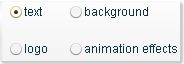 This panel is placed in the right upper part of the application. With this panel you will select what part of the banner you will be working on.
By default the panel has the "text" option selected.
To work on the background, image logo or animation effects select the appropriate radio button.
[to be completed...]
Get next to:
At the bottom of page you can see the help bar. While moving your mouse around you will see description of all the panels and buttons of the Magic Banner application.
the selection panel
This panel is placed in the right upper part of the application. With this panel you will select what part of the banner you will be working on. By default the panel has the "text" option selected.
To work on the background, image logo or animation effects select the appropriate radio button.
[to be completed...]
Get next to:
advertisement

what's new
Magic Banner logos and effects have been updated with seasons theme.
Get now a Christmas time banner.
Get now a Christmas time banner.
