background colors and gradients
The flash Magic Banner background is created dynamically based on three colors. These colors are set in a linear or in a gradient type.
You can change the background colors either by selecting one of the 32 presets or by adjusting each color at a time.
To use a preset gradient just click one of the colored buttons below the color picker . You can change the type of gradient just by clicking the appropriate radio button.

Creating a custom background
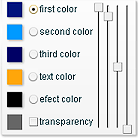 While clicking one of the preset color buttons you may observe that in the "sliders panel" the preview color boxes are changing.
Select one of the first three radio buttons labeled first color, second color, third color.
While clicking one of the preset color buttons you may observe that in the "sliders panel" the preview color boxes are changing.
Select one of the first three radio buttons labeled first color, second color, third color.
The sliders on the right side of the color preview boxes are meant to offer you a more accurate control on the color you want to choose.
Start dragging the first three sliders. The color of the selected preview box is changing.
The first three sliders are controlling the color components, red, green and blue. The fourth one is designed to change the transparency or the "alpha" of the color selected.
 If you are familiar with the hexadecimal values you can enter the specific value in the alphanumeric boxes below the sliders panel.
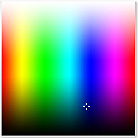 The color picker that you can find on the left is designed to help you choose a color with just one click.
A cross type mark appears pointing the active color.
Move around your mouse over the color picker panel and click again.
A new color is now selected.
Now you can preview the color in the banner.
Just click apply button.
To change each of the three colors of the background gradient you will have to adjust one color at a time by selecting the appropriate button.
Click apply when you are satisfied and move to the next radio button.
Get next to:
The flash Magic Banner background is created dynamically based on three colors. These colors are set in a linear or in a gradient type.
You can change the background colors either by selecting one of the 32 presets or by adjusting each color at a time.
To use a preset gradient just click one of the colored buttons below the color picker . You can change the type of gradient just by clicking the appropriate radio button.
Creating a custom background
While clicking one of the preset color buttons you may observe that in the "sliders panel" the preview color boxes are changing.
Select one of the first three radio buttons labeled first color, second color, third color. The sliders on the right side of the color preview boxes are meant to offer you a more accurate control on the color you want to choose.
Start dragging the first three sliders. The color of the selected preview box is changing.
The first three sliders are controlling the color components, red, green and blue. The fourth one is designed to change the transparency or the "alpha" of the color selected.
If you are familiar with the hexadecimal values you can enter the specific value in the alphanumeric boxes below the sliders panel.
The color picker that you can find on the left is designed to help you choose a color with just one click.A cross type mark appears pointing the active color.
Move around your mouse over the color picker panel and click again.
A new color is now selected.
Now you can preview the color in the banner.
Just click apply button.
To change each of the three colors of the background gradient you will have to adjust one color at a time by selecting the appropriate button.
Click apply when you are satisfied and move to the next radio button.
Get next to:
advertisement

what's new
Magic Banner logos and effects have been updated with seasons theme.
Get now a Christmas time banner.
Get now a Christmas time banner.
